


Subscribe to coachellis.blogspot.com

 Posts
All Comments
Posts
All Comments
Wednesday, February 12, 2014
Common Core Assessment Workbooks
One of the teachers in my building came across a free giveaway! Of course we love free, but even better when it focuses on Common Core State Standards and Assessment. The resource comes in the format of Common Core Assessment Workbooks. What I really liked about the resource is that it included and assessment for each standard of Math and ELA. There was also a variety of assessment types. Some of the assessment were actually for the teacher to complete. For example, there was an assessment for CCSS RL.K.1 which focuses on students actively engaging in group reading actives with purpose and understanding. So as the teacher works with a group of students she can quickly complete this performance task sheet that is simple to use and keep anecdotal notes on. The assessment are easy to follow. I chose to review the Kindergarten assessments and they are very student friendly. Many assessments "say" CCSS but I feel that this assessment is very usable and both teacher and student friendly. Check it out! This resource is definitely worth taking the time to review. As a member of my district's math development team and ELA development team, it has been interesting looking at the assessments and assessment verbiage of the workbook.

Thursday, December 5, 2013
The BEST PD (aside from EDCAMP)
Well it's been a while. This time of year is busy with deadlines, end of semester assessments, and of course the Holidays.
We recently had a district PLC Day. The morning was devoted to some district things and the afternoon agendas varied by school while still keeping a focus on district initiatives. One thing that our staff did was something that our principal created and called an "Instructional Potluck." Each staff member was responsible for bringing one strategy that they use or had used in their own classroom. The only rule is that it couldn't be a Pinterest or TeachersPayTeachers party. It could come from those resources BUT it had to be something that we all HAD tried in OUR classrooms.
This was the best PD session I have ever been apart of (aside from Edcamp ha!). So often we are so busy in our own classroom worlds that we don't get to "step" into others. This gave us a chance to see all of the neat ideas and strategies that other teachers across all grade levels are using with students. Not to mention that we walked away with about 20+ resources from EACH OTHER. There was such a variety of strategies shared and it was awesome to see people want to visit each other's classroom as a result.
I am a firm believer that "WE" are our best resource. No one out there has all the answers like our neighbors that teach next door to us.
I would highly suggest trying an Instructional Potluck with your staff!
We recently had a district PLC Day. The morning was devoted to some district things and the afternoon agendas varied by school while still keeping a focus on district initiatives. One thing that our staff did was something that our principal created and called an "Instructional Potluck." Each staff member was responsible for bringing one strategy that they use or had used in their own classroom. The only rule is that it couldn't be a Pinterest or TeachersPayTeachers party. It could come from those resources BUT it had to be something that we all HAD tried in OUR classrooms.
This was the best PD session I have ever been apart of (aside from Edcamp ha!). So often we are so busy in our own classroom worlds that we don't get to "step" into others. This gave us a chance to see all of the neat ideas and strategies that other teachers across all grade levels are using with students. Not to mention that we walked away with about 20+ resources from EACH OTHER. There was such a variety of strategies shared and it was awesome to see people want to visit each other's classroom as a result.
I am a firm believer that "WE" are our best resource. No one out there has all the answers like our neighbors that teach next door to us.
I would highly suggest trying an Instructional Potluck with your staff!
Friday, November 15, 2013
IETC 2013
Today was my first time presenting at IETC. I attended for the first time last year and was able to co-represent with one of the awesome teachers at my school. QR codes have become very popular during our 1:1 journey with iPads. I was a little nervous as I just got over a 2 week bout with the flu, stomach flu, and sinus infection. I just wanted to get through without falling over.
As we planned our session, we thought about the typical "sit and get." We did not want to give our attendees that type of experience. We wanted to motivate discussion and idea sharing, so that's exactly what we did or at least tried to do.
What was so awesome as presenters was to be able to make connections with others and hear other ideas and resources out there being used by others.
QR codes are fun but they have to serve a meaningful purpose and not just for the sake of using technology.
Big Takeaways:
If all else fails, just get a QR code tattoo linking to your contact info so you don't ever get lost :)
Below is the link to our presentation powerpoint.
Feel free to contact
 us for more information: @msellis61 @katemckearn
IETC 2013: Crazy for QR Codes Presentation
As we planned our session, we thought about the typical "sit and get." We did not want to give our attendees that type of experience. We wanted to motivate discussion and idea sharing, so that's exactly what we did or at least tried to do.
What was so awesome as presenters was to be able to make connections with others and hear other ideas and resources out there being used by others.
QR codes are fun but they have to serve a meaningful purpose and not just for the sake of using technology.
Big Takeaways:
- Dynamic vs. Static
- Work Flow w/QR Codes: Google Drive, DropBox
- Web Based Resources & Apps
- Tablet vs. Laptop Environment
- Flipped learning opportunities: www.virtualnerd.com, www.learnzillion.com, Khan Academy
- Professional Use, School Use, Classroom Use
- Single Device Classrooms vs. 1:1 Environment
If all else fails, just get a QR code tattoo linking to your contact info so you don't ever get lost :)
Below is the link to our presentation powerpoint.
Feel free to contact
IETC 2013: Crazy for QR Codes Presentation
Friday, October 4, 2013
The Power of the Pause Button
I've been working in a classroom in the area of math. I have utilized a few instructional videos made by using Educreations and ShowMe. The one thing that I really had to spend time talking to them about was the "power of the pause button." I would see them listening and watching, trying to write, looking for their pencil, and needing a tissue. In the midst of that, I saw pure panic. I finally stopped the class and told them that it was ok to stop the video. It's ok to rewind if you think you missed something or need to hear it again. It's ok to watch the video more than once. This made a real difference the second day of them interacting with the videos. Less hands were being raised just to tell me "I missed a part and I think I'm supposed to write something!". I saw them pausing, rewinding, watching it more than one, and becoming independent. I have seen such growth in the week of us working with the iTunesU course which I will tell you all about when we get deeper into my project with an awesome teacher who was willing to be brave and try something. Her goal was to create a self-paced, differentiated atmosphere where kids could work at their pace, get exactly what they needed, check in, and she can work with kids one on one and in small groups.
Goal=ALL STUDENTS participating in meaningful work
I have made instructional videos for the iTunesU course and I have used some that I found online. I asked the kids if they liked it, and so far so good. The pause button is just as important as the eraser tool in most apps. Without it, panic can rise.
Take the time to teach students the power of the pause button.
Monday, September 23, 2013
Totally Worth It!..
So as I've started to utilize Twitter more this year in my own learning, something wonderful happened as a result of my Twitter obsession. I saw tons of tweets about Edcamp and had no clue what it was all about. My instructional technology coach told me more about it so we registered to go. All we knew was that it an "unconference." We didn't know what to expect. We were so intrigued that we found one that was happening the soonest and registered. It was in Missouri and we thought "oh, 2 hours away is perfect." Yeah, total geography fail. It was actually in Springfield, MO which happens to be 6 hours away but we didn't let that stop us.
So Saturday morning after a long drive on Friday night, we headed to Willard High School for our first Edcamp experience.When we arrived, we made name tags with our name and twitter handle. We then received tickets. The tickets were used to enter into drawings for prizes. What I really liked about this was the choice aspect. Chrissie (follow her @techiechrissie) and I saw that one of the prizes was a Nearpod Gold Membership. We were stoked! Our teachers use Nearpod and we have been toying with the idea of purchasing a membership. I put every ticket into Nearpod with no hopes of winning because I never win anything. We then had breakfast (Panera, my fav). We heard announcements encouraging people to facilitate a session on a topic. Chrissie and I decided to #bebrave and facilitate a discussion about 1:1 development and implementation focusing on instruction and technology. After all of the sign-ups we were all able to choose sessions we were interested in attending. My first session was awesome with @kdgteach_123. It was about using Google Drive to track progress monitoring data in the primary grades. It was just what I needed and an answer to a teacher need at my school. The next session was facilitated by Chrissie and I. It was a great discussion. It really provided the opportunity to connect with other schools on the 1:1 journey and see the difference in PD, procedures, tech, etc. We attended lunch, an app shootout, one last session, and a Super Session.
They always say save the best for last. Well the best was prize time. Not only did I win the Nearpod Membership I wanted so badly, but I won the biggest prize, a Samsung Chromebook! Not only was #edcampsgf one of the best professional development opportunities I experienced, it was totally worth the 6 hour drive to come back with awesome prizes. Everyone was so welcoming and I made tons of new twitter friends.
I encourage everyone to attend one of if you can. Google it to find more info. We are already looking into how can we use this and where's the next (closest) edcamp. Maybe we will head on over to #edcampstl.


6 hour drive....new twitter friends...wonderful experience...new ideas..tons of learning...great prizes
It was totally worth it!
So Saturday morning after a long drive on Friday night, we headed to Willard High School for our first Edcamp experience.When we arrived, we made name tags with our name and twitter handle. We then received tickets. The tickets were used to enter into drawings for prizes. What I really liked about this was the choice aspect. Chrissie (follow her @techiechrissie) and I saw that one of the prizes was a Nearpod Gold Membership. We were stoked! Our teachers use Nearpod and we have been toying with the idea of purchasing a membership. I put every ticket into Nearpod with no hopes of winning because I never win anything. We then had breakfast (Panera, my fav). We heard announcements encouraging people to facilitate a session on a topic. Chrissie and I decided to #bebrave and facilitate a discussion about 1:1 development and implementation focusing on instruction and technology. After all of the sign-ups we were all able to choose sessions we were interested in attending. My first session was awesome with @kdgteach_123. It was about using Google Drive to track progress monitoring data in the primary grades. It was just what I needed and an answer to a teacher need at my school. The next session was facilitated by Chrissie and I. It was a great discussion. It really provided the opportunity to connect with other schools on the 1:1 journey and see the difference in PD, procedures, tech, etc. We attended lunch, an app shootout, one last session, and a Super Session.
They always say save the best for last. Well the best was prize time. Not only did I win the Nearpod Membership I wanted so badly, but I won the biggest prize, a Samsung Chromebook! Not only was #edcampsgf one of the best professional development opportunities I experienced, it was totally worth the 6 hour drive to come back with awesome prizes. Everyone was so welcoming and I made tons of new twitter friends.
I encourage everyone to attend one of if you can. Google it to find more info. We are already looking into how can we use this and where's the next (closest) edcamp. Maybe we will head on over to #edcampstl.

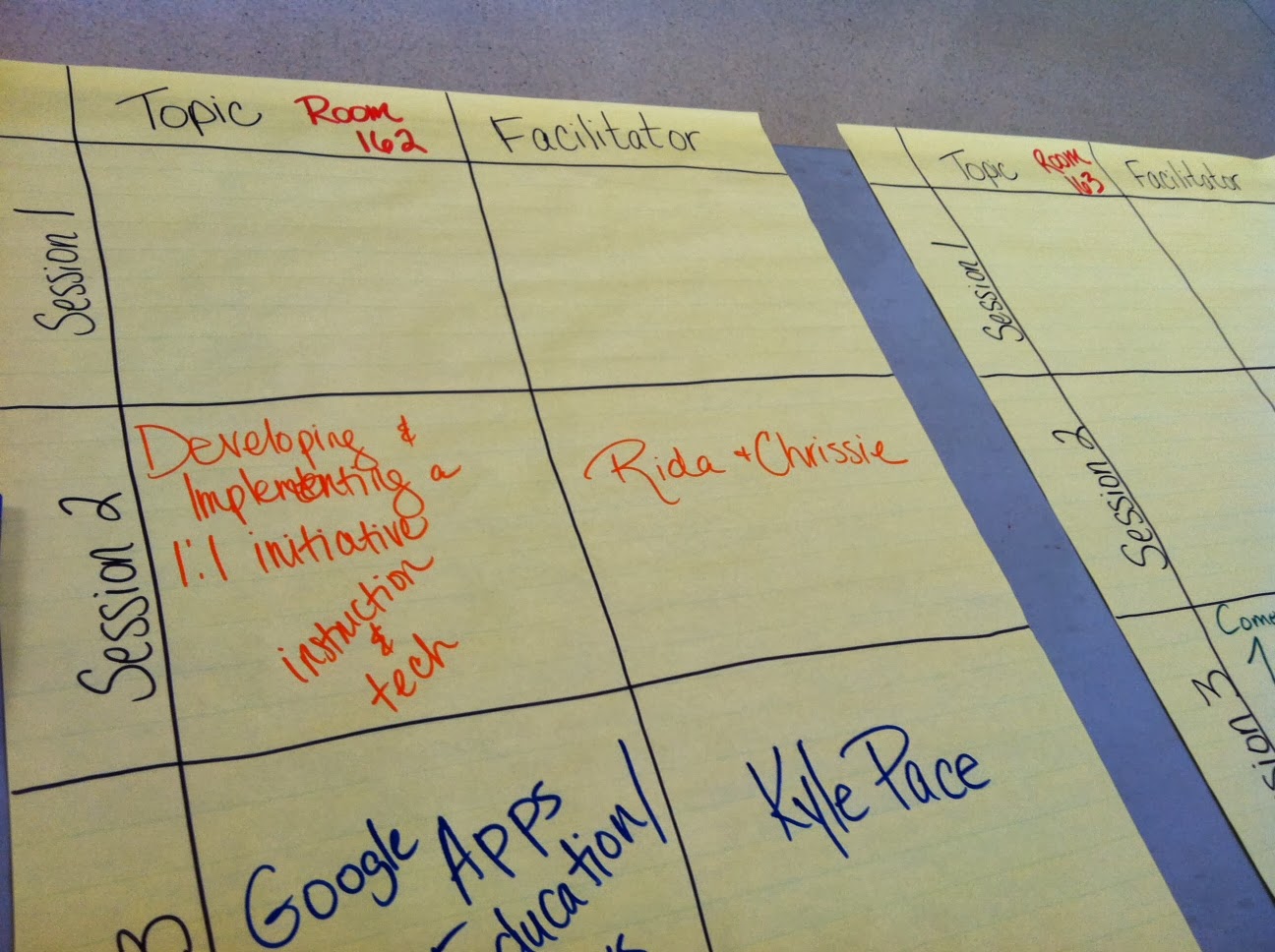
6 hour drive....new twitter friends...wonderful experience...new ideas..tons of learning...great prizes
It was totally worth it!
Saturday, September 14, 2013
Going Digital with Grandparents
This past week I headed a "Going Digital with Grandparents" event to celebrate Grandparents Day at school. I really wanted to find a way to better include our parents, grandparents, and families in our 1:1 quest. The kids read a book with their grandparents to start things off. That was the easy part. Once I gave the task of making a Book Commercial on the iPads, some of the grandparents got a little nervous. I heard a lot of "I can't even work my cell phone; how does this thing work." I had many giggles in our 2 hours together. An awesome moment occurred, I was able to say with great confidence, "Grandpa and Grandpas, if the iPads make you nervous and you aren't sure what to do, have no fear. The kids know exactly what to do." They were amazed that the little ones knew exactly what to do. By the end of their time together, some students created iMovies with their grandparents, showed them their projects and some of the apps that they use in their classroom, and many pictures were taken of grandmas and grandpas for students to see everyday on their iPads.
It's great to use the technology every day with the students. The magical moments occur when they are able to teach others and are excited to share what they do with the technology. Nothing's
better than combining family involvement, technology, literacy, fun, and snacks. It was wonderful!
How do you involve your family in your 1:1 environment or technology transformation?

It's great to use the technology every day with the students. The magical moments occur when they are able to teach others and are excited to share what they do with the technology. Nothing's
better than combining family involvement, technology, literacy, fun, and snacks. It was wonderful!
How do you involve your family in your 1:1 environment or technology transformation?

Thursday, September 5, 2013
"Ms. Ellis, It's Just Like the Show Catfish!"
This week has been so busy! I just hate 4-day weeks because there's so much to do with so little time. Well one of our poor teachers was sick this week. I felt so bad, but she's back to feeling better. She had a sub and I was asked to help the sub at the end of the day. I tried to think of an activity that would keep the students engaged for the rest of the day (2 hours!). I had been looking into the 1:1 digital citizenship lessons from www.commonsensemedia.org. The first lesson for 6th grade was taking a look at the Acceptable Use Policy. So I hurried downstairs to grab some copies and headed into a 6th grade class that looked like they were ready to eat me alive with a paper full of small words with major meaning. I explained to them the purpose of the lesson and the desired outcome. The desired outcome was that each student or group of students would create a kid friendly iMovie explaining the guidelines of our district's AUP.
I expected to get through the AUP in 30 minutes. OMG! The students were so engaged and couldn't believe the guidelines that were in the AUP. They were in shock. They were making some major connections. Then we reached the rule of not falsely representing yourself. The students talked about being able to "hide" behind a screen on Facebook which leads to internet bullying and fights, pretending to be a different age, and one student took it to that unexpected high in any lesson. "Ms. Ellis, it's just like the show catfish on MTV." That's when I knew they understood! She talked about how that show can ruin peoples lives and they told me to watch it that night. Ummm, weird show and it's kind of scary!
Their ability to make connections to those guidelines and see all of the expectations of them even though they have their own iPad really opened their eyes to their connection to the world right at their fingertips. What really hit home is when they truly understood that they have no privacy. Once you put it out there on the internet, blog, Edmodo for people to see, you can't always take it back. They were blow away that even I, as a district employee, have to follow the guidelines just like them.
I can't wait to keep working with this class on digital citizenship. One student told me "Ms. Ellis, you should send our iMovies somewhere." So my district's Director of IT has no idea, but I will soon be blowing up his email with AUP iMovies (guess, I will warn him by sending him this blog post ha!).
We have to take a different approach then telling students what they shouldn't do on their iPad and they have no idea why it important or for their safety. That only makes them want to "test the waters." I really think that one lesson went a long way with those 6th graders. Many people think that digital citizenship shouldn't be taught and that you address is as it comes up but sometimes when it comes up, it's too late and being too late can bring you to a bad episode of Catfish! Check out an episode below.
http://bit.ly/MTVsCatfish
I expected to get through the AUP in 30 minutes. OMG! The students were so engaged and couldn't believe the guidelines that were in the AUP. They were in shock. They were making some major connections. Then we reached the rule of not falsely representing yourself. The students talked about being able to "hide" behind a screen on Facebook which leads to internet bullying and fights, pretending to be a different age, and one student took it to that unexpected high in any lesson. "Ms. Ellis, it's just like the show catfish on MTV." That's when I knew they understood! She talked about how that show can ruin peoples lives and they told me to watch it that night. Ummm, weird show and it's kind of scary!
Their ability to make connections to those guidelines and see all of the expectations of them even though they have their own iPad really opened their eyes to their connection to the world right at their fingertips. What really hit home is when they truly understood that they have no privacy. Once you put it out there on the internet, blog, Edmodo for people to see, you can't always take it back. They were blow away that even I, as a district employee, have to follow the guidelines just like them.
I can't wait to keep working with this class on digital citizenship. One student told me "Ms. Ellis, you should send our iMovies somewhere." So my district's Director of IT has no idea, but I will soon be blowing up his email with AUP iMovies (guess, I will warn him by sending him this blog post ha!).
We have to take a different approach then telling students what they shouldn't do on their iPad and they have no idea why it important or for their safety. That only makes them want to "test the waters." I really think that one lesson went a long way with those 6th graders. Many people think that digital citizenship shouldn't be taught and that you address is as it comes up but sometimes when it comes up, it's too late and being too late can bring you to a bad episode of Catfish! Check out an episode below.
http://bit.ly/MTVsCatfish
Subscribe to:
Posts (Atom)